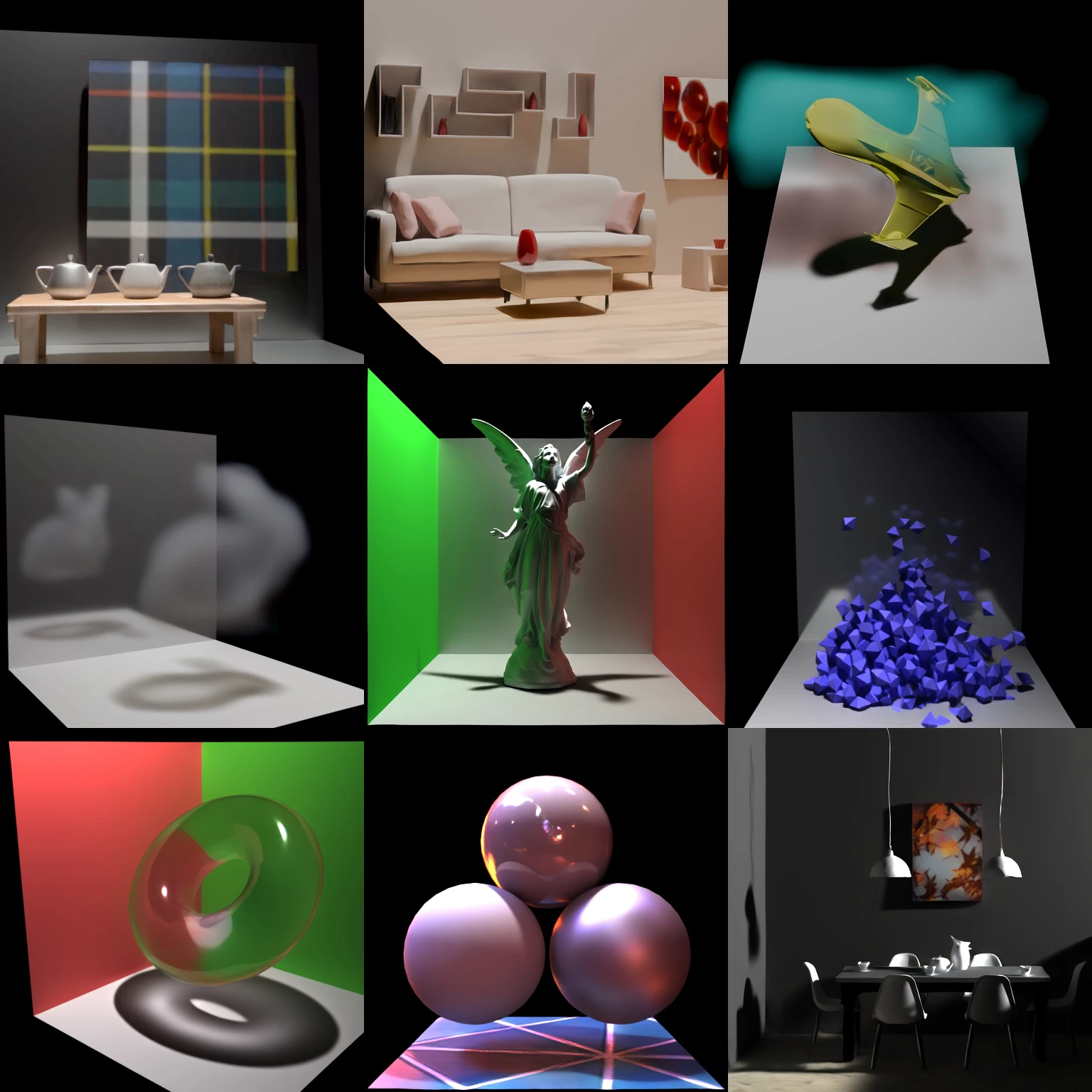
An ECCV 2026 project from Stanford, Microsoft Research and William & Mary, RenderFormer-V2 accepts geometry, materials, lights and cameras. The same weights render different scenes without per-scene training; the released models include native 512 and 2048 outputs.
What changes in the rendered image
V2 covers refraction, environment lighting, volumetric scattering, textured surfaces and displacement. That means transparent objects can bend the background, surrounding HDR light can illuminate a scene, and volumes can change visibility and light transport.
Materials use a learned appearance representation rather than only a fixed set of GGX parameters. For visual inspection, compare contact shadows, reflected surroundings and transmission through glass, not just whether the scene has the right colors.
From scene data to pixels
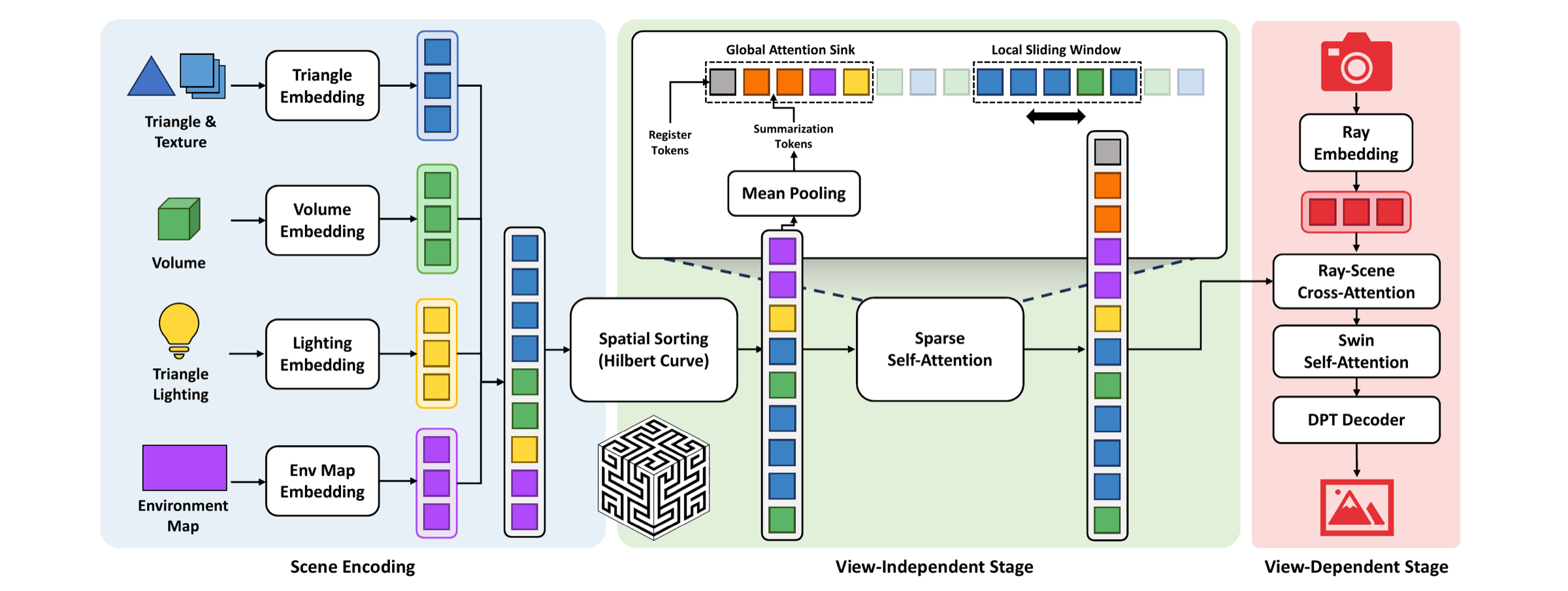
Triangles, volumes, area lights, environment maps and camera rays become tokens in one sequence. A view-independent stage models interactions between scene elements; a view-dependent stage then produces the camera image.
Windowed attention and a global attention sink let V2 handle scenes beyond 128K primitives, compared with the roughly 4K-triangle scale of V1. The model learns light transport rather than running a conventional ray tracer inside its rendering network.
Prepare and render your scene
Use RenderFormer Studio with Python 3.10 or 3.11 and the documented inference environment. Start with a supplied RF2 example. For custom Blender scenes, the V2 extension exports a prepared-frame intermediate; the data pipeline generates and converts it into the processed H5 used for rendering.
The command below renders a prepared scene with transformer_512. Select transformer_2048 with matching resolution for native 2048 output. The model bundle also contains material and texture-related components; use the matching V2 pipeline instead of a V1 loader.
renderformer infer \
  --input processed/scene.h5 \
  --checkpoint RenderFormer/renderformer-v2 \
  --checkpoint-subfolder transformer_512 \
  --precision fp16 \
  --output-dir outputs
Where it fits in a 3D workflow
RenderFormer-V2 comes after asset creation and scene assembly. A generated object can first be placed in Blender, given materials and lighting, then prepared for the renderer. MoGe-3 serves an earlier task: recovering visible geometry from a photograph.
The output is an image of the supplied scene, not a newly generated mesh. Use it to explore neural rendering of materials and lighting; use an image-to-3D generator when the missing piece is the object asset itself.
Generation, reconstruction or rendering?
| Tool | Input → output | Main role |
|---|---|---|
| Image-to-3D generator | Reference image → object asset | Create geometry and appearance |
| MoGe-3 | Photo → depth, points and visible geometry | Recover scene geometry |
| RenderFormer-V1 | Triangle scene → rendered image | Neural rendering at a smaller scene scale |
| RenderFormer-V2 | Mixed-primitive scene → rendered image | Refraction, environment lighting, textures and volumes |
Frequently asked questions
Can I send a GLB directly to the inference command?
The documented V2 inference input is a prepared H5 scene, not a bare GLB. Bring the asset into Blender, configure the scene, then follow the V2 export and data-preparation path.
Does every scene need its own training run?
No. The released pretrained model is designed to render different scenes with the same weights. Changing geometry, cameras or lighting does not require training a separate model for that scene.
Is it always faster than Blender Cycles?
The official timings use an NVIDIA A100 and Cycles at 4,096 adaptive samples per pixel. Speed depends on scene size, output resolution, hardware and quality settings; use the published benchmark conditions when comparing.