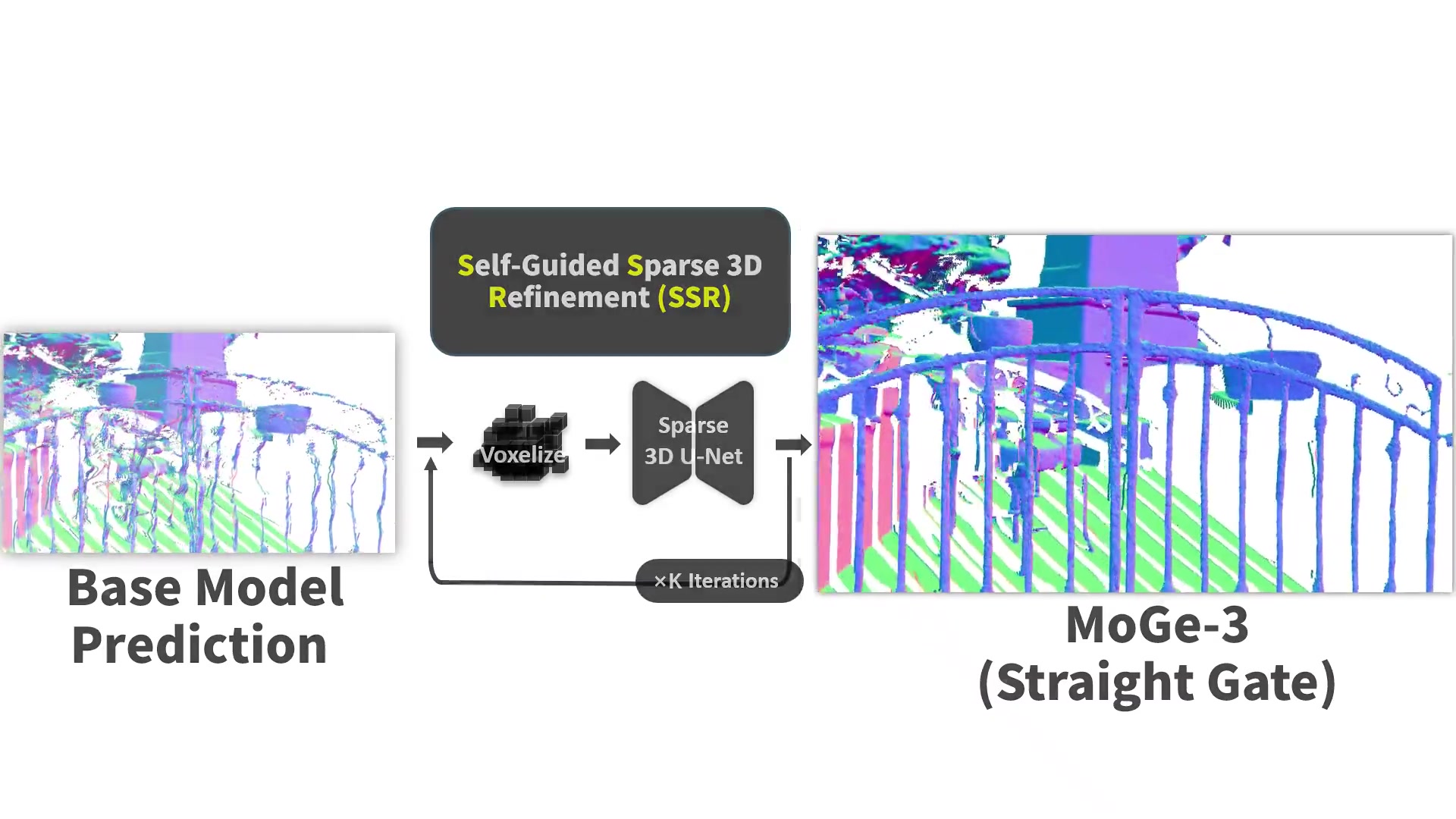
MoGe-3 is a geometry-estimation model developed by researchers at Tsinghua, USTC, and Microsoft Research. It predicts metric depth, point maps, normals, and camera geometry from a photo for depth-aware editing and scene reconstruction.
Why thin structures need 3D refinement
Pixels can be close in an image while belonging to surfaces far apart in 3D. Mixing their features can blur the geometry around railings, plants, and small objects.
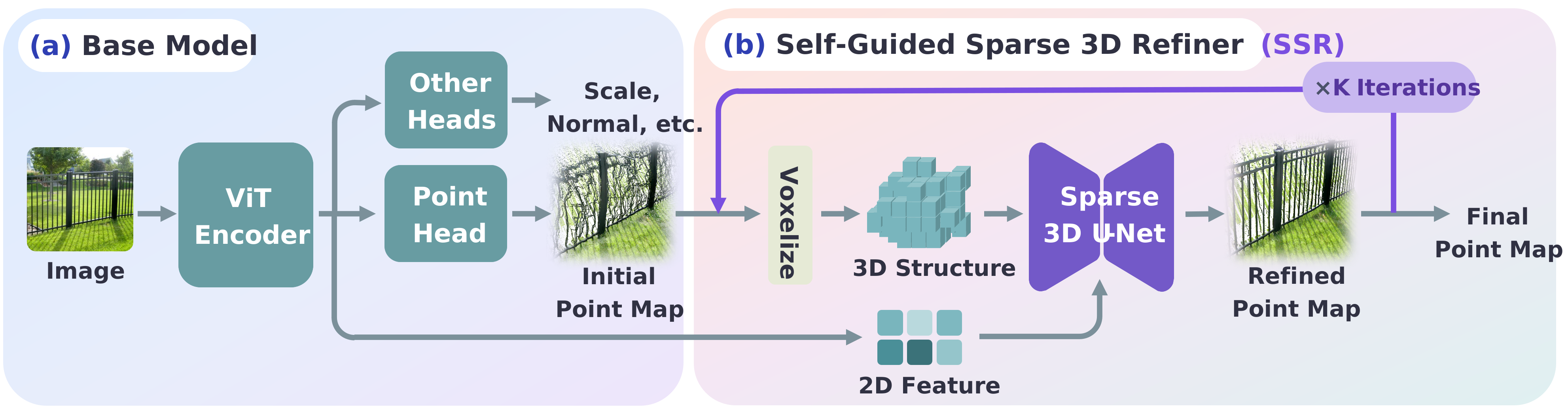
MoGe-3's Self-Guided Sparse Refinement lifts an initial point map into a sparse voxel shell. Sparse 3D convolutions use spatial neighbors instead of only image-plane neighbors, and repeated refinement recovers finer structures.
What you can export from a photograph
The MoGe toolchain supports point maps, depth maps, normal maps, and estimated camera field of view. Its inference CLI can save maps alongside GLB and PLY geometry files.
GLB stores image colors as a texture for inspection in a 3D viewer. PLY stores colors on vertices for geometry and point-cloud workflows. Choose the format that matches your editor or processing pipeline.
Run MoGe-3 with an explicit checkpoint
Use Python 3.10 or newer and install the repository dependencies. Select the model with --version v3, then supply your MoGe-3 checkpoint through --pretrained PATH_TO_CKPT.pt.
The command below exports maps and geometry with three refinement steps. Increasing refinement is not the same as increasing input resolution; compare thin structures and boundaries in the output before adding more steps.
moge infer -i photo.jpg \
  --version v3 \
  --pretrained PATH_TO_CKPT.pt \
  --refine_steps 3 \
  --output output \
  --maps --glb --ply
Choose scene geometry or a complete 3D asset
Use MoGe-3 when the arrangement of visible surfaces in a photo is the information you need. Examples include depth-aware compositions, an initial room surface, and geometry inspection.
Use image-to-3D generation when you need a complete product, prop, or character to rotate and reuse. MoGe-3 and asset generation answer different questions, even though both can end with a 3D file.
MoGe-3 vs image-to-3D asset generation
| Need | MoGe-3 | Asset generation |
|---|---|---|
| Primary goal | Recover visible scene geometry | Generate a complete reusable object |
| Typical input | A photograph of a scene or object | A clear reference image of the subject |
| Unseen surfaces | Not a measurement of hidden geometry | Completed by the generative model |
| Useful outputs | Depth/point maps, GLB, PLY | Object mesh and materials |
Frequently asked questions
Is MoGe-3 a TRELLIS 3 release?
No. MoGe-3 is a separate geometry-estimation project. TRELLIS models generate 3D assets; MoGe estimates geometry from visible image evidence.
Which MoGe-3 checkpoint can I use?
The official releases include ViT-L with 370M parameters and ViT-G with 1.25B. Both support metric geometry and normal maps. Download the chosen checkpoint and pass it with --pretrained while selecting --version v3.
Can I run the official MoGe-3 code on macOS?
The current repository explicitly says macOS is unsupported because its FlexGEMM dependency relies on Triton without macOS wheels. Use a compatible environment or the official browser demo.
Is there an online demo or ComfyUI integration?
The project links to the Ruicheng/MoGe-3 Hugging Face demo. ComfyUI v0.37.0, released on September 21, 2026, also added MoGe 3 support.